
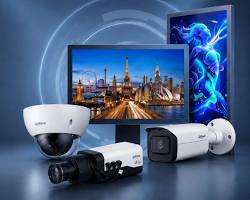
Dahua Monitors are specifically engineered for continuous, 24/7 security surveillance applications. Unlike standard consumer PC monitors, surveillance-grade displays feature high-durability panels, specialized thermal dissipation, burn-in protection, and versatile signal inputs (HDMI, VGA, BNC).
1. Key Series & Applications
| Series | Display Sizes | Primary Characteristics | Ideal Deployment |
| Entry-Level (LM Series) | 19.5″ – 27″ | 1080p Full HD, 24/7 operating rating, plastic/bezel-less design | Small home/office CCTV systems & standard NVR setups |
| Commercial / CCTV Grade | 32″ – 55″ | 4K Ultra HD resolution, BNC loop-through ports, built-in speakers | Commercial monitoring stations & multi-channel NVRs |
| Video Wall Displays | 46″ – 55″ | Ultra-narrow bezels (<1.8mm), industrial LCD panels, daisy-chaining | Enterprise control rooms, security command centers, video matrix systems |
2. Core Features of Dahua Surveillance Displays
- 24/7 Continuous Operation: Built with industrial-grade components designed to run non-stop without thermal throttling or performance degradation.
- Anti-Burn-In Technology: Features automatic pixel-shift mechanisms to prevent image retention (ghosting) caused by static multi-camera grid layouts.
- BNC Loop-Through Connectivity: Select commercial models include BNC composite video inputs/outputs, allowing direct analog camera or DVR connections without signal converters.
- Wide Viewing Angles: 178°/178° IPS/VA panels ensure clear visibility across monitoring room desks and multi-screen video walls.
3. How to Connect a Dahua Monitor to an NVR/DVR
- HDMI Connection (Recommended): Connect an HDMI cable from the NVR/DVR HDMI output port to the monitor’s HDMI input for up to 4K resolution and audio transmission.
- VGA Connection: For older recorders or secondary displays, connect a standard VGA cable and set the resolution to
1920x1080in the NVR display settings. - Display Configuration: Right-click the NVR interface, go to Main Menu > Display, and set the output resolution to match the monitor’s native display resolution.
Conclusion
Choosing a dedicated surveillance monitor ensures reliable color accuracy, wide viewing angles, and long-term durability compared to standard consumer displays.
Need Assistance Selecting Surveillance Hardware?
Choosing the right display resolution and signal connectivity for your NVR or video wall setup is critical for clear security monitoring. If you need help designing your control room or selecting compatible equipment, our technical team is ready to assist.
Contact Our Security Specialist Directly:
Phone / WhatsApp:
+966556088894



.%201.%20Key%20Series%20&%20Applications%20Series%20Display%20Sizes%20Primary%20Characteristics%20Ideal%20Deployment%20Entry-Level%20(LM%20Series)%2019.5″%20–%2027″%201080p%20Full%20HD,%2024/7%20%5B…%5D&media=https://dahua.nexcelsaudi.com/wp-content/uploads/2026/08/39.jpg)