
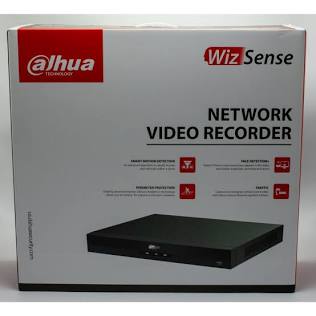
A Dahua Network Video Recorder (NVR) is the central hub of an IP surveillance system. Designed to receive, record, and process high-definition video feeds directly from IP cameras via Ethernet cables, Dahua NVRs offer advanced artificial intelligence analytics, high-throughput recording, and reliable 24/7 video storage.
1. Key Dahua NVR Series Comparison
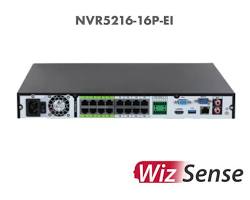
| Series | Channel Count | Video Resolution | Primary AI Features | Ideal Deployment |
| Lite Series | 4, 8, 16 Channels | Up to 8MP (4K) | Motion Detection 2.0, Smart H.265+ | Residential & small retail stores |
| WizSense Series (NVR4/5-I) | 4 to 32 Channels | Up to 16MP / 4K | SMD Plus, Perimeter Protection, Face Recognition | Commercial offices, warehouses, schools |
| WizMind Series (NVR6-I) | 16 to 128+ Channels | Up to 32MP / 8K | ANPR (License Plate), Video Metadata, Heat Mapping | Enterprise hubs, shopping malls, smart cities |
2. Core Features of Dahua NVRs
- Built-in PoE Ports (Plug & Play): Many Dahua NVR models feature integrated Power over Ethernet (PoE) ports, supplying power and network connectivity to IP cameras through a single Cat5e/Cat6 cable.
- Smart Motion Detection (SMD Plus): Utilizes deep-learning algorithms to filter out false alarms caused by animals, leaves, or weather, focusing exclusively on human and vehicle targets.
- Smart H.265+ Compression: Reduces bandwidth and storage requirements by up to 70% compared to standard H.264 without compromising image quality.
- Remote Access via DMSS: Connects seamlessly to the DMSS mobile app for iOS and Android, allowing real-time live view, playback, and instant push notifications.
3. How to Set Up a Dahua NVR System
- Install Surveillance Hard Drives: Unplug the NVR, open the top cover, and mount specialized surveillance hard drives (e.g., Western Digital Purple or Seagate SkyHawk) using the included SATA and power cables.
- Connect Cameras & Network: Plug your IP cameras into the NVR’s PoE ports (or connect them via a PoE switch on the same LAN). Connect an Ethernet cable from the NVR’s WAN/LAN port to your main router.
- Initial Boot & Wizard: Connect an HDMI monitor and mouse. Turn on the device and follow the initial startup wizard to set an administrative password, unlock pattern, and security recovery email.
- Initialize Cameras: Navigate to Main Menu > Camera > Registration. Click Device Search to discover and add connected IP cameras.
Conclusion
Choosing the right Dahua NVR depends on the required channel count, storage capacity, and artificial intelligence requirements. WizSense and WizMind models deliver advanced perimeter security and automated threat detection, making them effective solutions for modern surveillance setups.
Need Help Designing Your Dahua Surveillance System?
Selecting the right NVR bandwidth capacity, storage calculations, and AI camera compatibility requires careful planning. If you need assistance selecting hardware or configuring network settings, our technical team is ready to help.
Contact Our Security Specialist Directly:
Phone / WhatsApp:
+966556088894


%20is%20the%20central%20hub%20of%20an%20IP%20surveillance%20system.%20Designed%20to%20receive,%20record,%20and%20process%20high-definition%20video%20feeds%20directly%20from%20IP%20cameras%20via%20Ethernet%20cables,%20Dahua%20NVRs%20offer%20advanced%20artificial%20intelligence%20analytics,%20high-throughput%20recording,%20and%20reliable%2024/7%20video%20storage.%201.%20Key%20Dahua%20NVR%20Series%20Comparison%20Series%20Channel%20Count%20Video%20%5B…%5D&media=https://dahua.nexcelsaudi.com/wp-content/uploads/2026/08/41.jpg)