
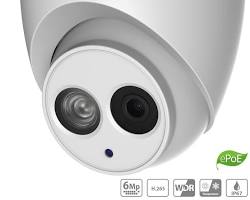
Dahua Eyeball Cameras (also commonly referred to as Turret Cameras) feature a distinct ball-and-socket enclosure design that combines the discreet aesthetic of traditional dome cameras with the glare-free night performance of bullet cameras. They are the most widely deployed camera style for residential, commercial, and outdoor security installations.
1. Why Choose an Eyeball (Turret) Design?
| Feature | Eyeball / Turret Design | Traditional Dome Camera |
| IR / Light Separation | Separate Glass: Lens and IR LEDs are physically separated, eliminating internal reflection and glare. | Single Glass Cover: IR light can reflect off scratches or dust on the dome cover. |
| Ease of Adjustment | 3-Axis Rotation: Smoothly pan, tilt, and rotate the ball by hand without removing plastic covers. | Requires taking off outer clear casing to adjust internal lens module. |
| Maintenance | Minimal Cleaning: No outer plastic bubble to accumulate raindrops, spiderwebs, or dust. | Requires frequent wiping to prevent fogging and surface glare. |
| Installation Speed | Quick-to-Install Base: Base plate mounts first, camera clips into place, and locks with a single screw. | Multi-step housing disassembly required. |
2. Key Technologies in Dahua Eyeball Lineup
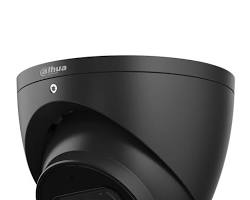
- WizSense & SMD 4.0 (Smart Motion Detection): Deep-learning AI filters out false motion alarms from wind, rain, and insects, triggering alerts only for human and vehicle targets.
- Full-Color / WizColor & Smart Dual Light: Utilizes ultra-large F1.0 apertures to keep full-color video active in low light, or stays on invisible IR until a human target approaches, triggering warm white lights for color event recording.
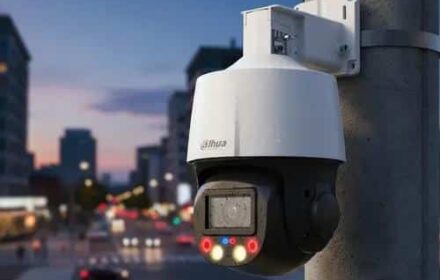
- TiOC (Three-in-One Camera): Integrates full-color video, AI perimeter protection, and active deterrence (red/blue flashing lights and a built-in siren) directly into the eyeball chassis.
- Audio & Weatherproofing: Built-in noise-canceling microphone, heavy-duty IP67 metal housing, and optional PoE (Power over Ethernet) power input.
3. How to Mount and Adjust a Dahua Eyeball Camera
- Mounting the Base: Separate the camera base plate from the main eyeball core. Secure the base plate to the ceiling or wall using the included screws or a junction box (PFB204W / PFA130-E).
- Routing Cable: Connect the RJ45 Ethernet cable (with waterproof boot) for PoE power and data.
- Locking & Aiming: Clip the eyeball unit onto the base ring. Rotate the camera manually to orient the lens toward your target zone (3-axis adjustment), then tighten the outer locking screw to lock the camera in place.
- Network Setup: Use Dahua ConfigTool to assign a static IP address, set up Smart Motion Detection (SMD), and link the feed to your NVR or DMSS mobile app.
Conclusion
Dahua eyeball cameras offer ideal versatility for both indoor soffit mounting and harsh outdoor perimeter protection, avoiding the IR reflection issues common with traditional domes while maintaining a compact, tamper-resistant profile.
Need Technical Support or Installation Guidance?
Selecting the right lens focal length (2.8mm for wide angle vs. 3.6mm for depth), matching junction boxes, or configuring AI tripwires requires careful planning. Our specialists are ready to assist with your layout requirements.
Contact Our Security Specialist Directly:
Phone / WhatsApp:
+966556088894


%20feature%20a%20distinct%20ball-and-socket%20enclosure%20design%20that%20combines%20the%20discreet%20aesthetic%20of%20traditional%20dome%20cameras%20with%20the%20glare-free%20night%20performance%20of%20bullet%20cameras.%20They%20are%20the%20most%20widely%20deployed%20camera%20style%20for%20residential,%20commercial,%20and%20outdoor%20security%20installations.%201.%20Why%20Choose%20an%20Eyeball%20(Turret)%20Design?%20%5B…%5D&media=https://dahua.nexcelsaudi.com/wp-content/uploads/2026/08/51.jpg)