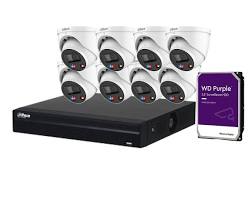
When setting up a CCTV or IP security system, choosing the right storage drive is as critical as selecting the cameras themselves. Standard desktop hard drives are not built to handle continuous 24/7 video recording. Surveillance-grade hard drives for Dahua DVRs and NVRs are engineered for constant write operations, lower power consumption, and thermal resilience.
This guide explores recommended hard drive types, storage calculation tips, and compatibility guidelines for Dahua recording systems.
1. Recommended Hard Drive Series for Dahua Systems
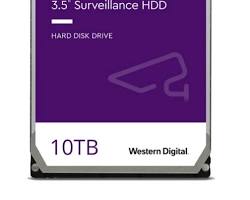
Dahua recorders are compatible with all major surveillance-grade 3.5-inch SATA hard drives. The most reliable options on the market include:
| Hard Drive Model | Optimized Use Case | Capacity Range | Key Advantages |
| Western Digital Purple (WD Purple) | 1–64 HD Cameras | 1 TB – 22 TB | AllFrame technology, reduced frame loss, engineered specifically for Dahua NVRs/DVRs |
| Seagate SkyHawk / SkyHawk AI | High-Channel & AI NVRs | 1 TB – 20 TB | ImagePerfect firmware, RV sensors for multi-bay chassis, heavy workload rating |
| Toshiba Surveillance (S300) | Small-to-Medium Systems | 1 TB – 10 TB | 24/7 continuous operation, high-temperature tolerance, cost-effective |
2. Key Features of Surveillance-Grade HDDs
- 24/7 Continuous Write Optimization: Standard PC drives are designed for a 50% read / 50% write workload, whereas surveillance drives are tuned for 90% write / 10% read operations.
- H.265+ Compression Efficiency: When paired with Dahua’s Smart H.265+ encoding, surveillance HDDs store up to 50%–70% more footage compared to older H.264 setups.
- Thermal & Vibration Resistance: Built to handle heat and rotational vibrations inside multi-bay Dahua NVR chassis without degrading performance.
- S.M.A.R.T. Health Monitoring: Dahua NVR and DVR system software directly integrates with HDD health diagnostics to alert users before drive failure occurs.
3. How to Calculate Required Storage Capacity
The required hard drive capacity depends on four main variables: number of cameras, resolution, frame rate (FPS), and retention period.
Quick Estimation Example:
- 4 Cameras @ 1080p (2MP) using H.265 compression = ~1 TB for 10–14 days of continuous recording.
- 8 Cameras @ 4K (8MP) using H.265 compression = ~4 TB to 6 TB for 14 days of continuous recording.
Conclusion
Equipping your Dahua DVR or NVR with a certified surveillance-grade hard drive guarantees smooth video playback, prevents frame dropping, and protects critical security footage. Avoid standard desktop drives to ensure your security infrastructure operates reliably around the clock.
Need Assistance Choosing the Right Surveillance System?
Navigating security camera options and configurations can be complex. Whether you are looking to secure your home or upgrade your business coverage, our technical specialists are ready to help you select and deploy the ideal Dahua security solutions tailored to your needs and budget.
Contact Our Security Specialist Directly:
Phone / WhatsApp:
+966556088894