
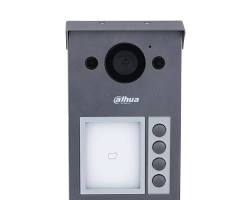
Dahua Outdoor Stations (also known as Video Terminal Outdoor / VTO) serve as the core door unit for Dahua’s IP and 2-wire Video Intercom systems. Installed at building gates, villa entrances, or apartment complex main doors, these devices integrate high-definition cameras, access control readers, keypads, and two-way audio modules to manage entry and communicate directly with indoor monitor stations (VTH) or smartphones via the DMSS app.
1. Dahua Outdoor Station Series Comparison
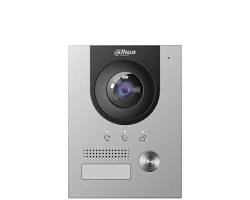
| Category / Model | Mounting & Form Factor | Core Features | Best Application |
| Villa Outdoor Station (e.g., VTO2111D / VTO2211G) | Compact Surface / Flush | Single call button, 2MP wide-angle lens, card reader (Mifare/IC), PoE support | Private villas, single-family homes, and small offices |
| Modular Outdoor Station (e.g., VTO4202F) | Customized modular frame | Interchangeable modules: camera, call buttons, keypad, fingerprint, and card reader | Luxury villas and custom residential layouts |
| Multi-Button Apartment VTO (e.g., VTO3211D-P) | Surface / Flush aluminum alloy | 2 or 4 direct call buttons, IP65 / IK08 vandal-proof rating | Duplex buildings, small multi-family residences |
| Digital Multi-Tenant VTO (e.g., VTO6541H / VTO7541G) | Flush / Wall mount with LCD/Touchscreen | Digital numeric keypad, face recognition, fingerprint, card reader, large LCD display | Apartment towers, gated communities, and large commercial plazas |
2. Key Technical Features
- High-Definition Wide-Angle Camera: 2MP resolution with WDR (Wide Dynamic Range) and IR/white-light night vision ensures clear face recognition even in backlighting or darkness.
- Multiple Unlocking Methods: Supports IC/Mifare RFID cards, passcodes (keypad), fingerprint scanning, facial recognition, and remote unlocking via indoor monitors or the DMSS mobile app.
- Weatherproof & Vandal-Resistant: IP65/IP67 ingress protection against rain and dust, alongside IK07/IK08/IK10 impact ratings in heavy-duty aluminum or stainless-steel housings.
- Standard PoE & 2-Wire Options: Available in standard Power over Ethernet (PoE 802.3af) for IP network setups, or 2-wire hybrid models that reuse legacy doorbell cabling.
- SIP Protocol Support: Native SIP integration allows the VTO to connect to third-party IP PBX systems or standard VoIP communication channels.
3. How to Set Up a Dahua Outdoor Station (VTO)
- Physical Mounting & Cable Connection: Mount the outdoor station housing (surface or flush box). Connect an Ethernet cable to the RJ45 port for PoE power and data, or run 2-wire connections to a 2-wire switch.
- Door Lock Wiring: Connect the electric strike or magnetic lock to the VTO’s internal relay (
NO/COMorNC/COM) and connect an external power supply or door exit button to the input terminals. - Initialization & IP Assignment: Launch Dahua ConfigTool on your PC, search for the uninitialized VTO, set a password, and assign a static IP address on your local network subnet.
- SIP & Indoor Monitor Pairing: Access the VTO web interface (
http://<VTO-IP>), go to VTH Management, and add the room number of your indoor monitor (VTH). Ensure the VTO acts as the primary SIP server (or connect both to a central Dahua DSS server). - Mobile App Pairing: Scan the VTO’s QR code using the DMSS app to receive real-time video call notifications and unlock doors remotely from anywhere.
Conclusion
Dahua outdoor stations deliver a secure, modern entrance management system combining video surveillance, two-way voice communication, and advanced access control for single homes and large multi-tenant buildings alike.
Need Assistance Designing or Installing Your Video Intercom System?
Configuring SIP server settings, lock wiring relays, or multi-tenant indoor monitor routing requires technical precision. If you need assistance selecting or installing your Dahua intercom setup, our team is here to help.
Contact Our Security Specialist Directly:
Phone / WhatsApp: +966556088894


%20serve%20as%20the%20core%20door%20unit%20for%20Dahua’s%20IP%20and%202-wire%20Video%20Intercom%20systems.%20Installed%20at%20building%20gates,%20villa%20entrances,%20or%20apartment%20complex%20main%20doors,%20these%20devices%20integrate%20high-definition%20cameras,%20access%20control%20readers,%20keypads,%20and%20two-way%20audio%20modules%20to%20manage%20entry%20and%20communicate%20directly%20%5B…%5D&media=https://dahua.nexcelsaudi.com/wp-content/uploads/2026/08/53.jpg)